


Hardware components | ||||||
 |
| × | 1 | |||
 |
| × | 1 | |||
 |
| × | 1 | |||
 |
| × | 1 | |||
 |
| × | 1 | |||
 |
| × | 1 | |||
Software apps and online services | ||||||
| ||||||
This project is a Smart Fire Alert System that uses an LM35 temperature sensor to detect sudden rises in temperature. When a potential fire is sensed, the system immediately activates a buzzer and LED for local alerts. It's a low-cost, efficient safety solution ideal for homes, schools, and offices.
STEPSFORTHEHARDWARECONNECTIONS:
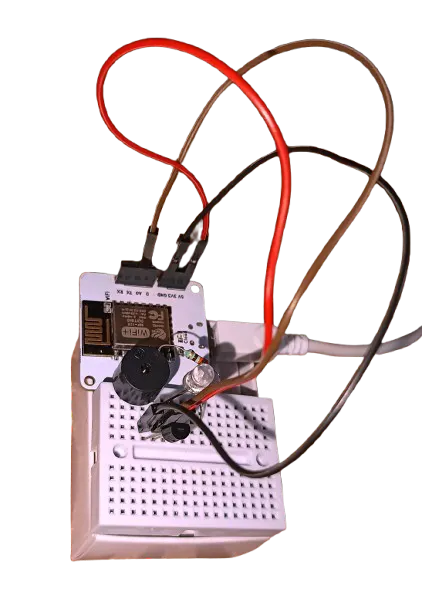
- Connect the LM35 temperature sensor's leftmost pin to +5V(Vcc), middle pin to A0 pin and the rightmost pin to the GND pin.
- Now connect one LED, with its longer leg, to GPIO pin 4 through a 330 ohms resistor and its shorter leg to the GND pin.
- The buzzer must also be connected in the same manner as LED, with its longer leg to GPIO pin 1 and shorter one to GND. (No resistor is required for this).
- After making the connections, switch on the bolt wifi module and make sure the wifi and the cloud lights remain glowing.
- For testing the project, bring a burning matchstick near the LM35 sensor and record the changes in the temperature.(Makesurethat the flame is atleast 5cm away from the sensor or any other component)
- The buzzer and the LED must operate, when the temperature crosses the threshold, with a time gap of a second until the temperature comes back to its normal value.
BELOW IS THE COMPLETEPYTHON CODE :
#conf.py

API_KEY = 'Bolt Cloud API key'
DEVICE_ID = 'Device ID'

#main.py

import conf
from boltiot import Bolt
import time
import json

bolt = Bolt(conf.API_KEY, conf.DEVICE_ID)
THRESHOLD_TEMP = 30.50

def get_temperature():
    response = bolt.analogRead('A0')
    data = json.loads(response)

    if not data["success"]:
        print("Error reading analog value:", data["value"])
        return None

    analog_value = int(data["value"])

    temp_c = analog_value/10.24
    return temp_c

while True:
    temperature = get_temperature()
    if temperature is None:
        continue

    print(f"Temperature: {temperature:.2f}°C")

    if temperature > THRESHOLD_TEMP:
        print("High temperature detected! Activating alarm.")
        # Blink LED and Buzzer together
        bolt.analogWrite('4', 230)  # LED ON
        bolt.analogWrite('1', 230)  # Buzzer ON
        time.sleep(1)
        bolt.analogWrite('4', 0)   # LED OFF
        bolt.analogWrite('1', 0)   # Buzzer OFF
        time.sleep(1)
    else:
        print("Temperature normal. No alarm.")
        bolt.digitalWrite('4', 'LOW')   # Ensure OFF
        bolt.digitalWrite('1', 'LOW')   # Ensure OFF
        time.sleep(5)  # Less frequent checks when safe
EXPLANATION OF THE CODE:
conf – a conf.py file where we have stored our API key and Device ID.Bolt – The main Bolt IoT Python class time – Used to introduce delays (e.g., blinking LED/buzzer). json – Used to decode the response from the Bolt cloud API.
The function get_temperature() is used to Read analog value from LM35 on pin A0 and Converts it to Celsius using the formula:temperature = analog_value / 10.24It Returns the temperature in °C.
Th while loop so used is for the continuous monitoring the temperature.
The conditional statements, triggers alarm if the temperature crosses threshold. It turns on LED and buzzer using analogWrite() function with value 230. It Keeps them ON for a second, then turns them OFF for the next 1 second (like blinking).
If the temperature is normal, it Waits for 5 seconds before the next check (less frequent check when no danger).


Comments